

概述
- 本指南说明了如何排查并升级处理与 Skip Go 交易相关的问题。
- 排查问题时应使用 Skip Go Explorer。
- 支持的交易类型包括:CCTP、Eureka、Layerzero、Stargate、Opinit、Axelar、IBC、Go Fast。
- 工具:Explorer、Skip API
第 1 步:在我们的 Explorer 中检查状态
- 使用我们的 Explorer。
- 如果你在 go.skip.build 的历史记录中点击交易链接,将会打开已预加载该交易详情的页面。
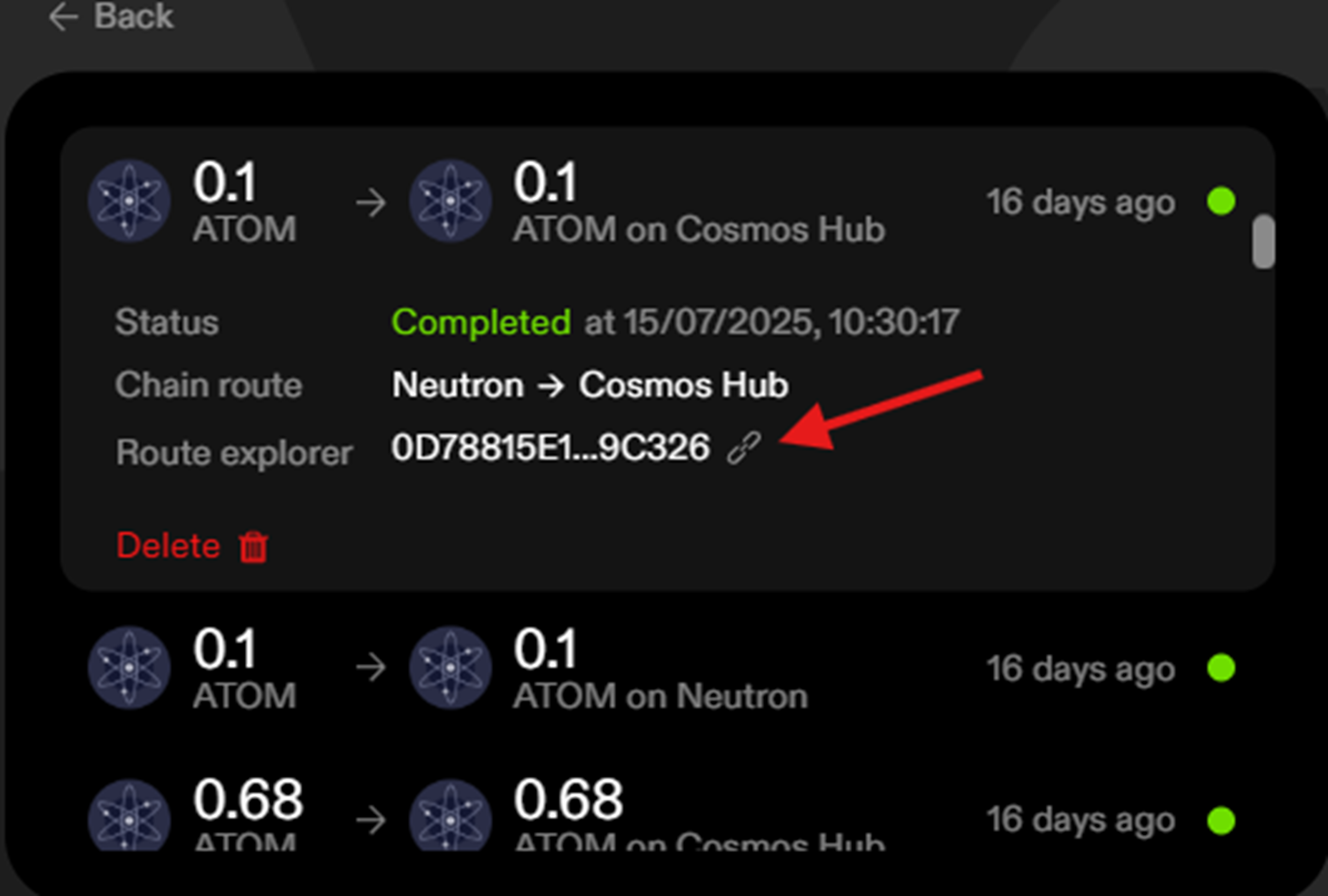
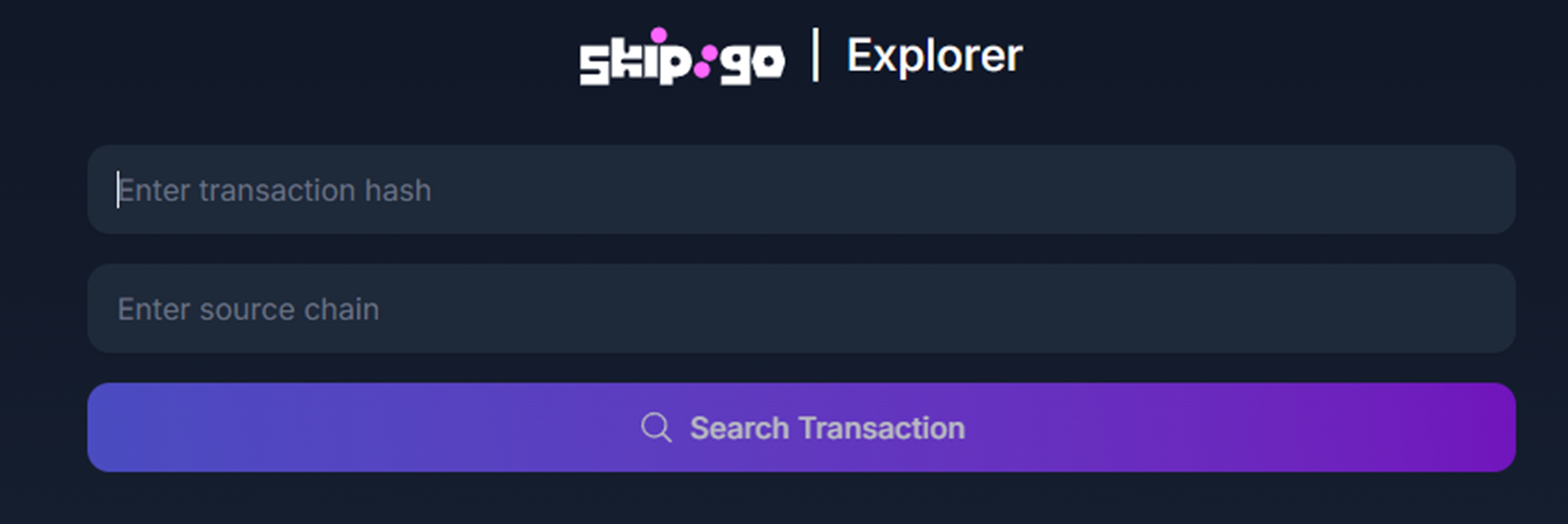
- 如果你的历史记录中没有这笔交易,请找到源交易哈希并将其输入我们的 Explorer。
- 必填信息:
- 初始交易哈希
- 链名称
第 2 步:交易状态
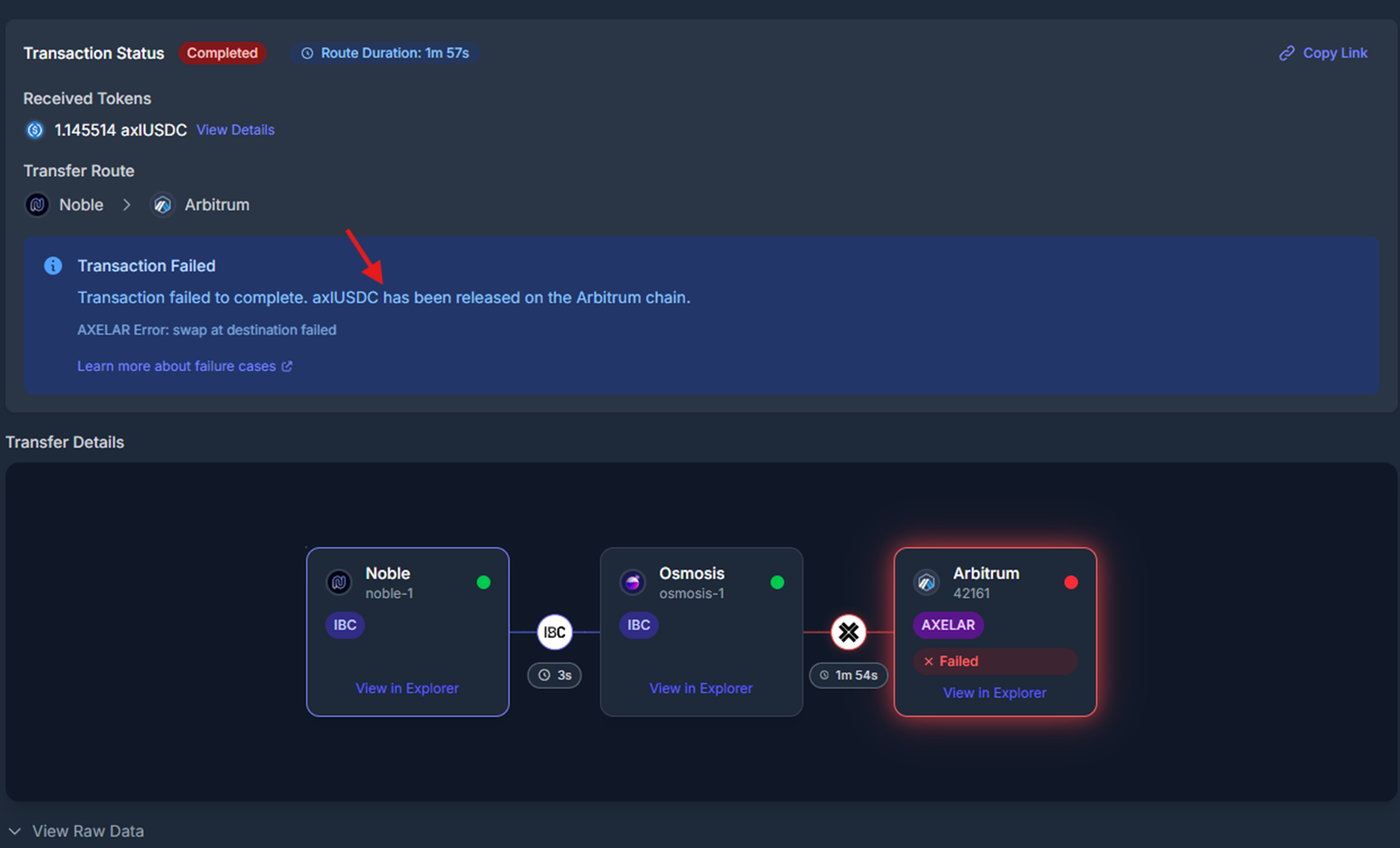
state_completed_success、state_pending、state_abandoned 等。若交易失败,Explorer 会告诉你资金被释放到了哪里、交换在哪一步失败,以及释放的是什么资产。
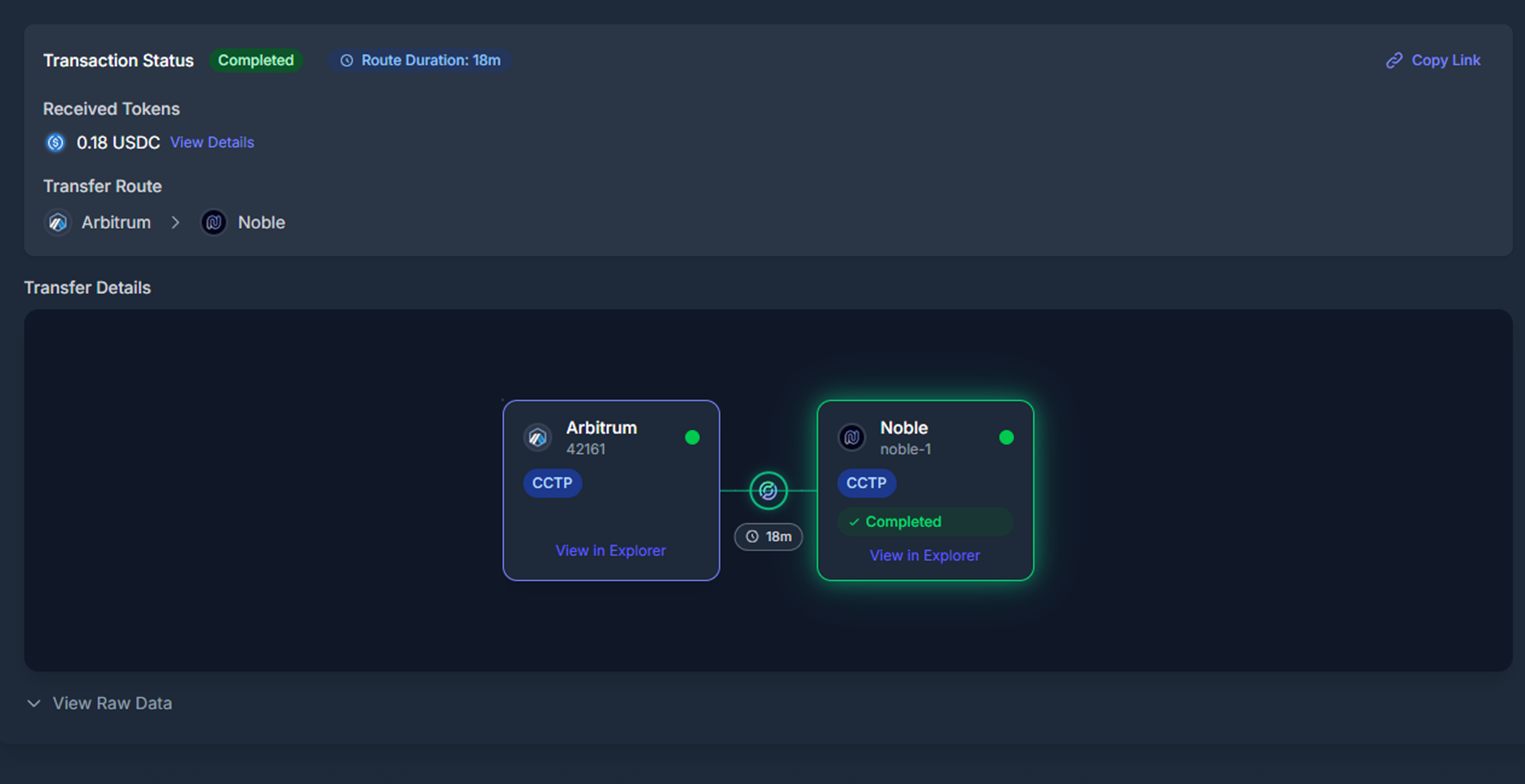
- 如果没有显示状态,Explorer 会提示你重新索引/追踪该交易:
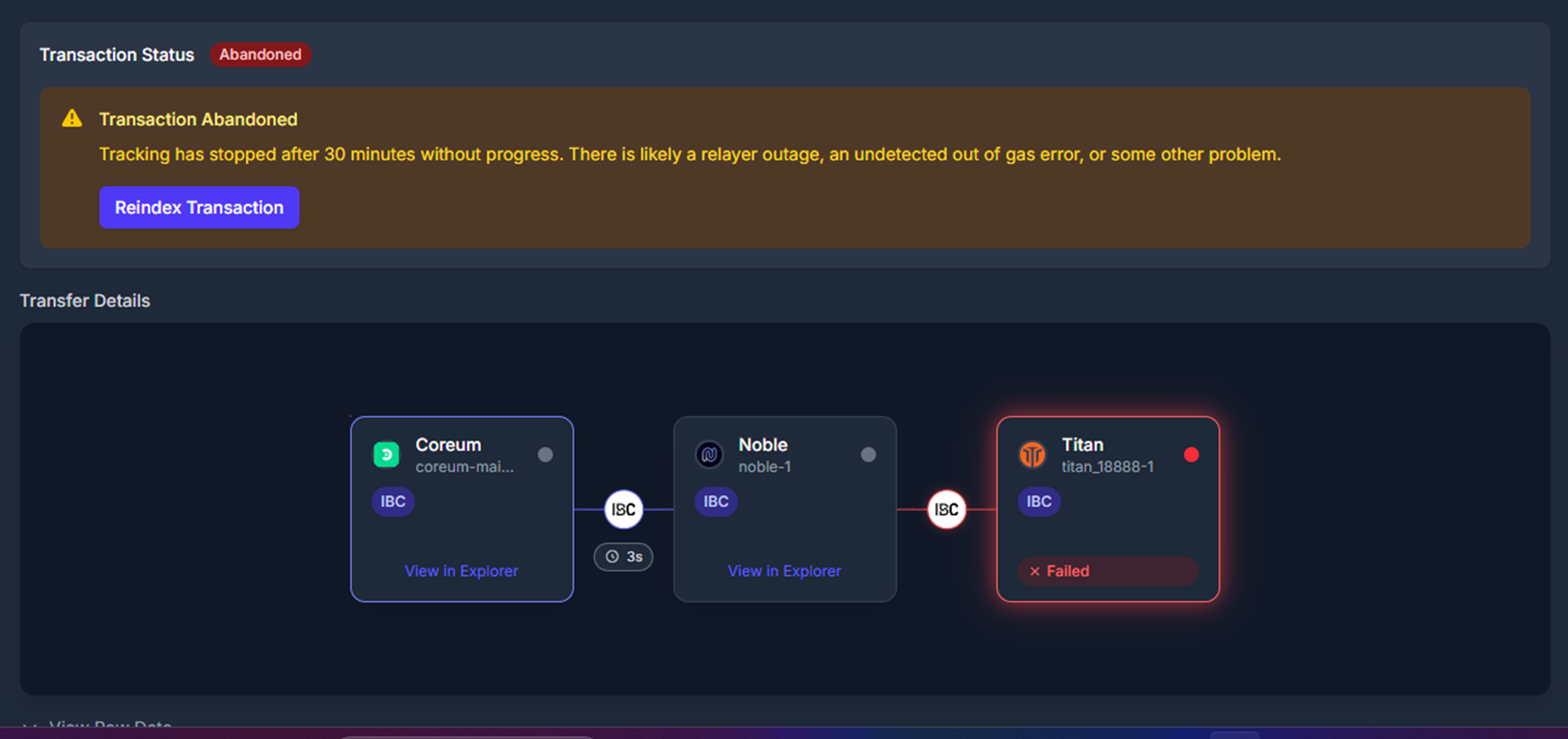
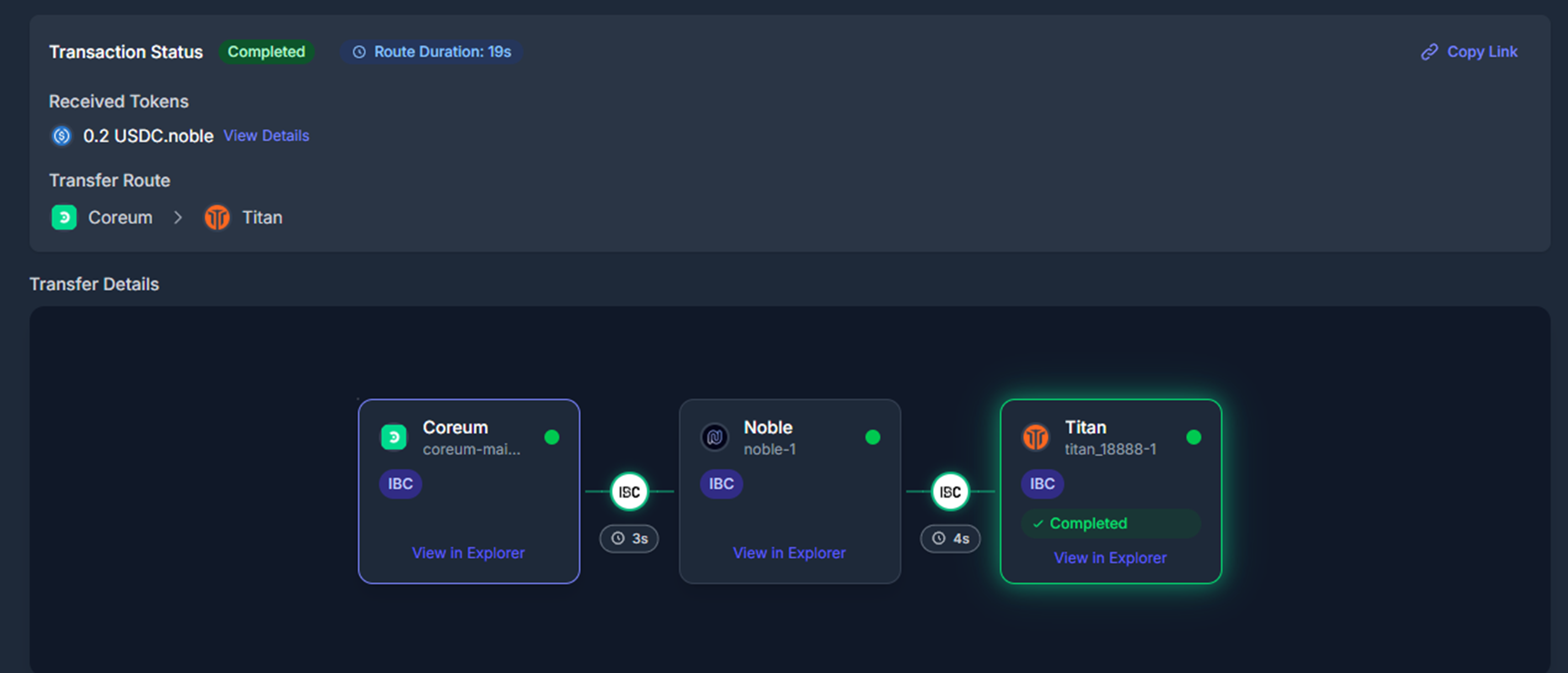
- 索引完成后,交易状态会更新。以下是成功、失败和待处理状态的示例:
- Explorer 会显示你的资金在链上被释放的位置:
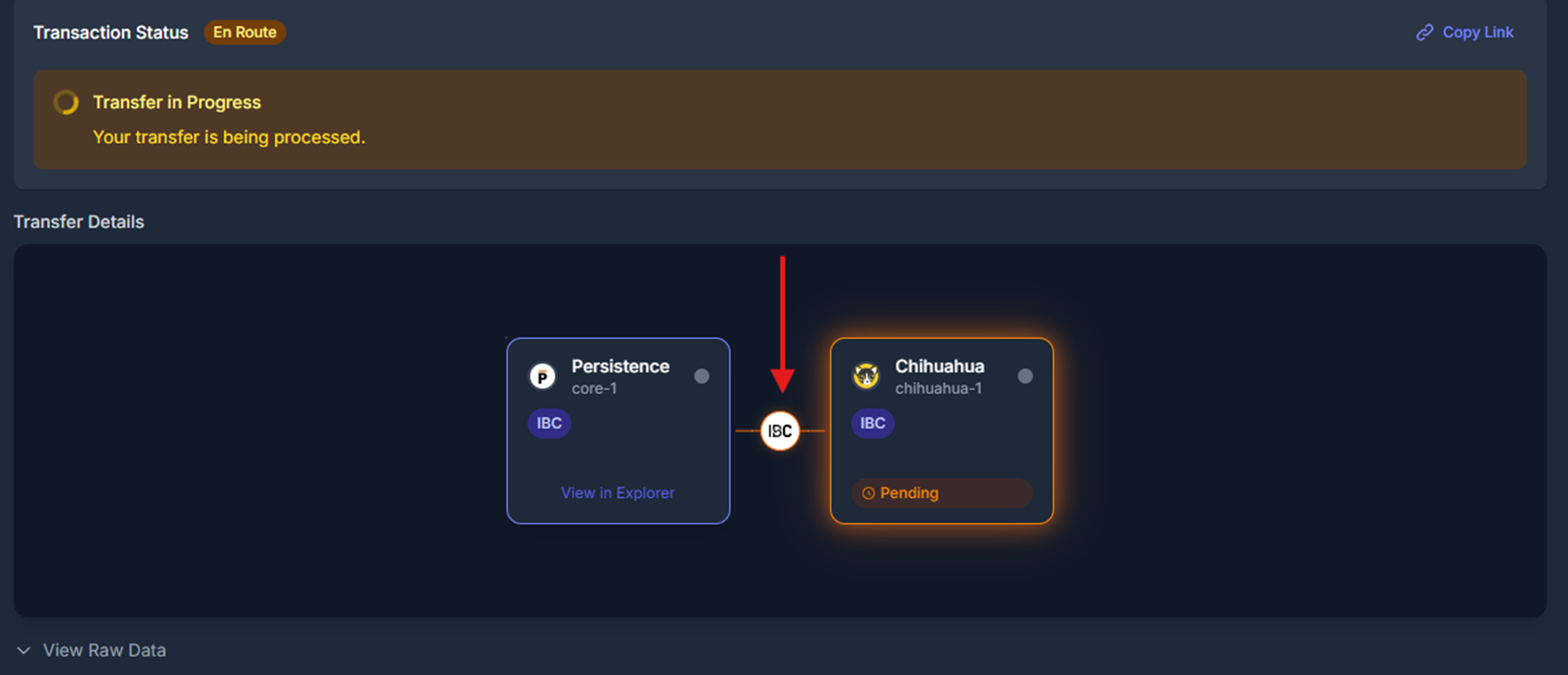
- 如果你的 IBC 交易处于待处理状态,最多可能需要 24 小时才能完成。
- 如果你仍然找不到资金的释放、退款或到账位置,请前往第 3 步。
扩展传输数据与状态
Skip Go 支持多种传输机制。请参考以下内容以了解并排查每种交易类型。IBC Transfers
了解更多:IBC Transfer Details- 状态:
TRANSFER_PENDING:已发送,等待接收。最多可能需要 24 小时才能在链上收到。TRANSFER_RECEIVED:已接收,但如果是多跳传输,仍可能回滚。TRANSFER_SUCCESS:已成功完成。TRANSFER_FAILURE:传输失败。TRANSFER_PENDING_ERROR:发生错误,退款处理中。
- 交易:
send_tx、receive_tx、timeout_tx、acknowledge_tx
Axelar Transfers
了解更多:Axelar Transfer Details- 状态:
AXELAR_TRANSFER_PENDING_CONFIRMATION:等待 Axelar 确认。AXELAR_TRANSFER_PENDING_RECEIPT:已确认,等待接收。AXELAR_TRANSFER_SUCCESS:资产已到账。AXELAR_TRANSFER_FAILURE:传输失败。
- 交易:
send_tx、confirm_tx、execute_tx- 也可能包括:
gas_paid_tx、approve_tx
CCTP Transfers
了解更多:CCTP Transfer Details- 状态:
CCTP_TRANSFER_SENT:销毁交易已提交。- ‘CCTP_TRANSFER_PENDING_CONFIRMATION’ - CCTP 转账正在等待 cctp attestation api 确认
CCTP_TRANSFER_CONFIRMED:已由 Circle 确认。CCTP_TRANSFER_RECEIVED:已在目标链收到。
- 交易:
send_tx、receive_tx
Hyperlane Transfers
了解更多:Hyperlane Transfer Details-
状态:
HYPERLANE_TRANSFER_SENT:源链上的传输交易已执行。HYPERLANE_TRANSFER_RECEIVED:目标链已收到该传输。HYPERLANE_TRANSFER_FAILED:传输未能完成。PACKET_ERROR_TIMEOUT:数据包已超时。PACKET_ERROR_ACKNOWLEDGEMENT:数据包确认阶段发生错误。
-
交易:
send_tx、receive_tx
OPInit Transfers
了解更多:OPInit Transfer Details- 状态:
OPINIT_TRANSFER_SENT:源链上的存款交易已执行。OPINIT_TRANSFER_RECEIVED:已在目标链收到。OPINIT_TRANSFER_FAILURE:传输失败。PACKET_ERROR_TIMEOUT:数据包已超时。PACKET_ERROR_ACKNOWLEDGEMENT:数据包确认阶段发生错误。
- 交易:
send_tx、receive_tx
Go Fast Transfers
了解更多:Go Fast Transfer Details- 状态:
GO_FAST_TRANSFER_SENT:意图已提交。GO_FAST_TRANSFER_FILLED:成功。GO_FAST_TRANSFER_TIMEOUT、REFUNDED、POST_ACTION_FAILED
- 交易:
order_submitted_tx、order_filled_tx、order_timeout_tx、order_refunded_tx
Stargate Transfers
了解更多:Stargate Transfer Details- 状态:
STARGATE_TRANSFER_SENT、RECEIVED、FAILED、UNKNOWN
- 交易:
send_tx、receive_tx、error_tx
Eureka Transfers
了解更多:Eureka Transfer Details-
状态:
TRANSFER_SUCCESS:Eureka 传输已成功完成。TRANSFER_RECEIVED:Eureka 传输已被目标链接收。TRANSFER_PENDING:Eureka 传输进行中。TRANSFER_FAILURE:Eureka 传输失败。PACKET_ERROR_ACKNOWLEDGEMENT:数据包确认阶段发生错误PACKET_ERROR_TIMEOUT:数据包在到达目标前已超时
-
**交易:**通常包括
send_tx、receive_tx
LayerZero Transfers
-
状态:
LAYER_ZERO_TRANSFER_SENT:已在源链发起传输LAYER_ZERO_TRANSFER_RECEIVED:资产已在目标链到账LAYER_ZERO_TRANSFER_FAILED:传输失败LAYER_ZERO_TRANSFER_UNKNOWN:无法确定传输状态
-
**交易:**通常包括
send_tx、receive_tx和ack_tx
第 3 步:如有需要,进行升级处理
- 如果你无法定位资金,请在 Interchain Discord 中提交工单。

Overview
- This guide outlines how to troubleshoot and escalate issues related to Skip Go transactions.
- The Skip Go Explorer should be used when troubleshooting
- Types of transactions supported (CCTP, Eureka, Layerzero, Stargate, Opinit, Axelar, IBC, Go Fast)
- Tools: Explorer, Skip API
Step 1: Check Status in our Explorer
- Use our Explorer
- If you click on your link transaction in your history on go.skip.build it will open with the transaction details preloaded.
- If you do not have the transaction in your history, please locate the source transaction hash and enter it into our Explorer
- Required inputs:
- Initial Transaction hash
- Chain Name
Step 2: Transaction status
state_completed_success, state_pending, state_abandoned, etc. The explorer will tell you where your funds have been released if the transaction has failed, the swap failed and what asset has been released.
- If there is no state given, the explorer will ask to reindex/track your transaction:
- After indexing, the status of your transaction will be updated. Example of successful, failed and pending states:
- The explorer will show where your funds have been released on chain:
- If your IBC transaction is pending, it may take upto 24 hours to clear.
- If you cannot find where your funds are released, refunded, received, please go to step 3.
Expanded Transfer Data & Statuses
Skip Go supports multiple transfer mechanisms. Use the following references to understand and debug each type of transaction.IBC Transfers
Learn more: IBC Transfer Details- States:
TRANSFER_PENDING: Sent, waiting to be received. May take upto 24 hours to be received on chain.TRANSFER_RECEIVED: Received, may still revert if multi-hop.TRANSFER_SUCCESS: Completed successfully.TRANSFER_FAILURE: Transfer failed.TRANSFER_PENDING_ERROR: Error occurred, refund pending.
- Transactions:
send_tx,receive_tx,timeout_tx,acknowledge_tx
Axelar Transfers
Learn more: Axelar Transfer Details- States:
AXELAR_TRANSFER_PENDING_CONFIRMATION: Waiting for Axelar confirmation.AXELAR_TRANSFER_PENDING_RECEIPT: Confirmed, awaiting receipt.AXELAR_TRANSFER_SUCCESS: Assets received.AXELAR_TRANSFER_FAILURE: Transfer failed.
- Transactions:
send_tx,confirm_tx,execute_tx- May also include:
gas_paid_tx,approve_tx
CCTP Transfers
Learn more: CCTP Transfer Details- States:
CCTP_TRANSFER_SENT: Burn submitted.- ‘CCTP_TRANSFER_PENDING_CONFIRMATION’ - CCTP transfer is pending confirmation by the cctp attestation api
CCTP_TRANSFER_CONFIRMED: Confirmed by Circle.CCTP_TRANSFER_RECEIVED: Received on destination chain.
- Transactions:
send_tx,receive_tx
Hyperlane Transfers
Learn more: Hyperlane Transfer Details-
States:
HYPERLANE_TRANSFER_SENT: The transfer transaction on the source chain has executed.HYPERLANE_TRANSFER_RECEIVED: The transfer has been received on the destination chain.HYPERLANE_TRANSFER_FAILED: The transfer failed to complete.PACKET_ERROR_TIMEOUT: The packet timed out.PACKET_ERROR_ACKNOWLEDGEMENT: Error in packet acknowledgement.
-
Transactions:
send_tx,receive_tx
OPInit Transfers
Learn more: OPInit Transfer Details- States:
OPINIT_TRANSFER_SENT: The deposit transaction on the source chain has executed.OPINIT_TRANSFER_RECEIVED: Received at the destination chain.OPINIT_TRANSFER_FAILURE: The transfer has failed.PACKET_ERROR_TIMEOUT: The packet timed out.PACKET_ERROR_ACKNOWLEDGEMENT: Error in packet acknowledgement.
- Transactions:
send_tx,receive_tx
Go Fast Transfers
Learn more: Go Fast Transfer Details- States:
GO_FAST_TRANSFER_SENT: Intent submitted.GO_FAST_TRANSFER_FILLED: Success.GO_FAST_TRANSFER_TIMEOUT,REFUNDED,POST_ACTION_FAILED
- Transactions:
order_submitted_tx,order_filled_tx,order_timeout_tx,order_refunded_tx
Stargate Transfers
Learn more: Stargate Transfer Details- States:
STARGATE_TRANSFER_SENT,RECEIVED,FAILED,UNKNOWN
- Transactions:
send_tx,receive_tx,error_tx
Eureka Transfers
Learn more: Eureka Transfer Details-
States:
TRANSFER_SUCCESS: The Eureka transfer has completed successfully.TRANSFER_RECEIVED: The Eureka transfer has been received by the destination chain.TRANSFER_PENDING: The Eureka transfer is in progress.TRANSFER_FAILURE: The Eureka transfer has failed.PACKET_ERROR_ACKNOWLEDGEMENT: Error in packet acknowledgementPACKET_ERROR_TIMEOUT: The packet timed out before reaching the destination
-
Transactions: Typically includes
send_tx,receive_tx
LayerZero Transfers
-
States:
LAYER_ZERO_TRANSFER_SENT: Transfer initiated on the source chainLAYER_ZERO_TRANSFER_RECEIVED: Assets received on the destination chainLAYER_ZERO_TRANSFER_FAILED: Transfer failedLAYER_ZERO_TRANSFER_UNKNOWN: Transfer state could not be determined
-
Transactions: Usually
send_tx,receive_tx, andack_tx
Step 3: Escalate if needed
- If you are unable to locate your funds please open a ticket in the Interchain Discord