

背景
/v2/tx 端点包含统一 API,用于广播交易并洞察交易状态及其后续的跨链动作。
你可以使用 /v2/tx 端点实时跟踪一次跨链转账或兑换的进度,无论该转账会经过多少条链或多少座桥。(对于更高级的用例,这些端点还支持跟踪在单笔交易中发起的多个彼此独立的转账。)
你也可以用它来识别失败场景(例如因滑点导致失败的兑换,或因中继器未激活而失败的 IBC 转账),并确定用户的代币最终会在何处可用。
例如,如果你的某个终端用户发起了一笔兑换,起始资产是在 Neutron 上的 ATOM,结束资产是在 Osmosis 上的 ATOM,你可以使用生命周期跟踪来报告 ATOM 何时从 Neutron 转移到 Osmosis。
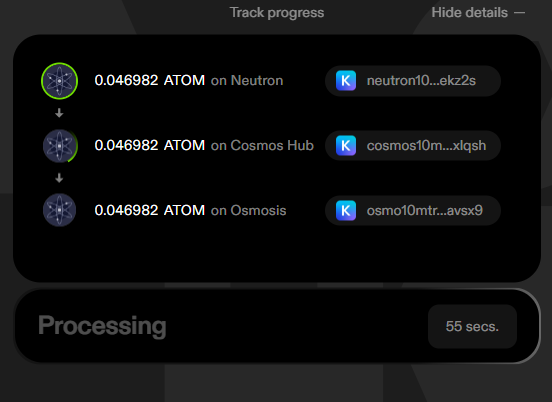
基础
从高层来看,交易跟踪分为两个阶段:- 通过
/v2/tx/submit将特定交易提交到链上,或先提交到你自己的 Node RPC 再调用/v2/tx/track,以告知我们的跟踪引擎你希望跟踪这笔交易 - 按固定时间间隔查询交易状态,以获取其进度更新
跟踪多个独立路由你可以使用该端点跟踪在单笔交易中发起的多个转账,其中第
i 笔转账的状态由 transfers 数组中的第 i 项给出。例如,我可以在一笔交易中将 ATOM 转到 Cosmos Hub,并将 OSMO 转到 Osmosis,然后分别通过 transfers[0] 和 transfers[1] 跟踪它们。对于包含多跳的单笔转账(例如先将 ATOM 转到 Cosmos Hub,再转到 Osmosis),你可以使用 transfers[i].transfer_sequence 中的各项来跟踪每一跳的状态。重要的高层 /v2/tx/status 字段
transfers 数组中的每一项对应一条单独的路由,这条路由可能包含很多步骤,而 transfer_sequence 中的每一项都会包含该路由中每个步骤的非常详细的信息。
但无论你的路由执行什么操作,或者涉及哪些桥,每个 transfers 条目中都有一些高层字段会很有用:
state:路由的基础状态。这让你可以向用户报告路由的基础状态(例如进行中、失败等)STATE_SUBMITTED:表示该交易已被接受并开始跟踪,但尚未发现链上证据。STATE_ABANDONED:30 分钟内没有进展后,跟踪已停止。很可能是中继器故障、未被检测到的 gas 不足错误,或其他问题。STATE_PENDING:路由进行中,且尚未发生错误。STATE_PENDING_ERROR:路由进行中,且某处发生了错误,但错误当前仍在传播,因此用户的代币尚未退回。(该状态只会出现在需要在源链上处理错误所对应的_确认消息_的协议中。目前仅 IBC 会出现这种情况。)STATE_COMPLETED_SUCCESS:路由已成功完成,用户已在目标位置获得其代币(由transfer_asset_release指示)。STATE_COMPLETED_ERROR:路由在某处发生错误,且用户的代币已经在其某个钱包中解锁。代币可能位于源链、中间链,或目标链上但资产类型不正确。(transfer_asset_release会指示代币所在位置。)
next_blocking_transfer:给出transfer_sequence中的索引,表示当前正在传播、并且直接阻塞用户代币释放的那笔转账,对应next_blocking_transfer.transfer_sequence_index(它可能是向前传播,也可能是错误 ack 向后传播)。这让你可以准确告诉用户当前具体是哪一步操作正在等待中transfer_asset_release:关于当路由完成时用户代币将在哪释放的信息。该字段会在STATE_PENDING_ERROR、STATE_COMPLETED_SUCCESS或STATE_COMPLETED_ERROR时填充。这让你可以在成功或失败的情况下告诉用户应去哪里找回资金 (如果你想更好地理解如何预测这一点,或资金最终可能落在哪里,请参阅跨链失败场景)transfer_asset_release.released:布尔值,表示资金当前是否可用(如果状态是STATE_PENDING_ERROR,该值将为false)transfer_asset_release.chain_id:资产已释放或即将释放的链transfer_asset_release.denom:用户最终持有的代币面额
详细信息:使用 transfer_sequence
transfer_sequence 数组由 TransferEvent 对象构成,它们提供单个转账操作的详细信息。该对象相当于一个包装层,包裹着我们所支持的每种桥对应的详细信息对象:
CCTPTransferInfoIBCTransferInfoAxelarTransferInfoHyperlaneTransferInfoGoFastTransferInfoStargateTransferInfo
from_chain_idto_chain_id- 转账过程中所有关键事件的交易与区块浏览器链接(发送交易、接收交易,有时还包括确认交易)
- 一个表示转账状态的字段,具体取值会因桥而异
IBC 转账数据
transfer_sequence 数组中的 IBCTransferInfo 条目里,state 字段具有以下含义:
TRANSFER_UNKNOWN:转账状态未知TRANSFER_PENDING- 该转账的发送包已提交,转账正在处理中TRANSFER_PENDING_ERROR- 转账过程中出现了问题(例如数据包已超时),但由于错误仍在传播,用户的资金尚未解锁TRANSFER_RECEIVED- 转账数据包已被目标链接收。如果它是多跳 PFM 转账的一部分,仍然可能失败并回滚TRANSFER_SUCCESS- 转账已成功完成,不会再回滚TRANSFER_FAILURE- 该转账
packet_txs 包含最多 4 笔交易的交易哈希、链 ID 和区块浏览器链接:
send_tx:数据包从源链发出receive_tx:数据包在目标链被接收timeout_tx:数据包在目标链超时acknowledge_tx:数据包在源链上的成功或失败确认
Axelar 转账数据
当其中一笔转账是 Axelar 转账时,transfer_sequence 数组中会提供 axelar_transfer(AxelarTransferInfo),而不是 ibc_transfer,其包含的数据不同,原因如下:
- Skip Go API 可能会使用 send_token 或 contract_call_with_token(Axelar 的两种底层协议),具体取决于哪种更便宜,以及哪种是执行用户意图所必需的
- Axelar 不像 IBC 那样具有 packet 或 ack 的概念
- Axelar 提供了一个好用的高层 UI(Axelarscan)来跟踪其转账状态
type:枚举值,可能为AXELAR_TRANSFER_SEND_TOKEN或AXELAR_TRANSFER_CONTRACT_CALL_WITH_TOKEN,分别表示该 Axelar 转账是 Send Token 还是 Contract Call With Token 转账。axelar_scan_link:给出 Axelar 桥浏览器的链接(可帮助排查并解除卡住的交易)state字段使用以下值表示 Axelar 转账的当前状态:AXELAR_TRANSFER_UNKNOWN- 转账状态未知AXELAR_TRANSFER_PENDING_CONFIRMATION- 转账已发起,但仍等待 Axelar 网络确认AXELAR_TRANSFER_PENDING_RECEIPT- 转账已被 Axelar 网络确认,但仍等待在目标链完成接收AXELAR_TRANSFER_SUCCESS- 转账已成功完成,资产已在目标端收到AXELAR_TRANSFER_FAILURE- 转账失败
txs字段的结构取决于转账的type- 如果
type是AXELAR_TRANSFER_SEND_TOKEN,则包含 3 笔交易:send_tx(发起转账)confirm_tx(在 axelar 上确认转账)execute_tx(在目标端执行转账)
- 如果
type是AXELAR_TRANSFER_CONTRACT_CALL_WITH_TOKEN:send_tx(发起转账)gas_paid_tx(在源链上支付中继器 gas 费用)approve_tx(在 Axelar 上批准该交易,仅当目标链是 EVM 链时存在)confirm_tx(在 Axelar 上确认该转账,仅当目标链是 Cosmos 链时存在)execute_tx(在目标端执行转账)
- 如果
CCTP 转账数据
当其中一笔转账是 CCTP 转账时,transfer_sequence 数组中会提供 cctp_transfer(CCTPTransferInfo),而不是 ibc_transfer,其包含的数据不同,原因如下:
- CCTP 的工作方式是由 Circle 对转账进行证明并签署确认
- CCTP 中没有确认消息(ack)的概念
state给出 CCTP 转账的状态:CCTP_TRANSFER_UNKNOWN- 未知错误CCTP_TRANSFER_SENT- 源链上的销毁交易已执行CCTP_TRANSFER_PENDING_CONFIRMATION- CCTP 转账正在等待 cctp attestation api 确认CCTP_TRANSFER_CONFIRMED- CCTP 转账已被 cctp attestation api 确认,但尚未在目标链接收CCTP_TRANSFER_RECEIVED- CCTP 转账已在目标链接收
txs包含两笔交易的链 ID、区块浏览器链接和哈希:send_tx:该交易在源链上提交了 CCTP 销毁操作,以发起转账receive_tx:用户在目标链上收到资金的交易
Hyperlane 转账数据
当某一笔转账是 Hyperlane 转账时,transfer_sequence 数组中会提供 hyperlane_transfer(HyperlaneTransferInfo),而不是 ibc_transfer,其中包含不同的数据,原因如下:
- Hyperlane 是一个非常灵活的协议,“批准/验证”转账这一概念并没有明确定义,而是由桥开发者自行实现
- Hyperlane 中没有 acknowledgement 的概念
state给出 Hyperlane 转账的状态:HYPERLANE_TRANSFER_UNKNOWN- 未知错误HYPERLANE_TRANSFER_SENT- 源链上的 Hyperlane 转账交易已执行HYPERLANE_TRANSFER_FAILED- Hyperlane 转账失败HYPERLANE_TRANSFER_RECEIVED- Hyperlane 转账已在目标链接收
txs包含两笔交易的链 ID、区块浏览器链接和哈希:send_tx:在源链上提交 CCTP 销毁操作以发起转账的交易receive_tx:用户在目标链上收到资金的交易
OPInit 转账数据
当某一笔转账是 OPInit 转账时,transfer_sequence 数组中会提供 op_init_transfer(OPInitTransferInfo),而不是 ibc_transfer,其中包含不同的数据,原因如下:
- OPInit 桥是 Initia 生态系统中的原生跨桥方案,用于促进 Initia 与各个 Minitia 之间的转账。
- OPInit 桥中没有 acknowledgement 的概念
state给出 OPInit 转账的状态:OPINIT_TRANSFER_UNKNOWN- 未知错误OPINIT_TRANSFER_SENT- 源链上的存款交易已执行OPINIT_TRANSFER_RECEIVED- OPInit 转账已在目标链接收
txs包含两笔交易的链 ID、区块浏览器链接和哈希:send_tx:在源链上提交 OPInit 存款操作以发起转账的交易receive_tx:用户在目标链上收到资金的交易
Go Fast 转账数据
当某一笔转账是GoFastTransfer 时,transfer_sequence 数组中将包含 go_fast_transfer(GoFastTransferInfo)。该字段包含有关用户发起意图和求解器履约的特定信息,因此需要专门的数据字段来跟踪转账流程。
下面是对不同字段及其用途的详细说明:
from_chain_id:转账发起所在的链 ID(源链)。to_chain_id:资产将被发送到的链 ID(目标链)。state:表示转账的当前状态。可能的值包括:GO_FAST_TRANSFER_UNKNOWN:发生了未知错误。GO_FAST_TRANSFER_SENT:用户的意图已成功提交到源链。GO_FAST_POST_ACTION_FAILED:转账的意图后操作失败。例如,目标链上的兑换因滑点失败。GO_FAST_TRANSFER_TIMEOUT:转账未在预期时间内完成。GO_FAST_TRANSFER_FILLED:转账已在目标链上成功履约。GO_FAST_TRANSFER_REFUNDED:用户的资产已在源链上退款。
txs:包含与 GoFast 转账相关的交易详情:order_submitted_tx:用户在源链上调用initiateIntent的交易。order_filled_tx:求解器在目标链上调用fulfill的交易。order_refunded_tx:如果适用,用户在源链上收到退款的交易。order_timeout_tx:表明转账流程发生超时的交易。
error_message:如果适用,描述转账过程中发生错误的消息。
GoFastTransferInfo 来监控链间资产转移的进度和状态。例如,如果状态为 GO_FAST_TRANSFER_FILLED,则表示转账成功,你的资产应该已经可在目标链上使用。如果状态为 GO_FAST_TRANSFER_TIMEOUT,你可以检查 orderTimeoutTx 以查看超时事件的详细信息。
Stargate 转账数据
当某一笔转账是StargateTransfer 时,transfer_sequence 数组中将包含 stargate_transfer(StargateTransferInfo)。它提供了由 Stargate 支持的跨链资产转账的详细信息,Stargate 是一种流行的跨链桥协议。
下面是对这些字段及其用途的详细说明:
-
from_chain_id:转账发起所在的链 ID(源链)。 -
to_chain_id:资产将被发送到的链 ID(目标链)。 -
state:表示 Stargate 转账的当前状态。可能的值包括:STARGATE_TRANSFER_UNKNOWN:发生了未知错误,或无法确定状态。STARGATE_TRANSFER_SENT:转账已在源链上成功发起(即资产已离开源链并处于传输过程中)。STARGATE_TRANSFER_RECEIVED:转账已在目标链上成功完成(即资产现在已可在目标链上的接收地址使用)。STARGATE_TRANSFER_FAILED:转账在跨桥过程中发生错误,未按预期完成。
-
txs:包含与 Stargate 转账相关的交易详情。send_tx:在源链上发起 Stargate 转账的交易。receive_tx:在目标链上接收资产的交易。error_tx:与转账失败相关的交易(如果有)。
StargateTransferInfo 来确认资产是否已安全地在链之间完成跨桥,或者识别问题是否发生以及发生在哪里。
Go Fast Protocol 涉及与求解器的交互,由它们来履行转账意图。额外的交易字段有助于在整个转账过程中提供透明度和可追踪性,确保用户能够跟踪每一步,并识别可能出现的任何问题。
典型用法的详细示例
下面将通过一个示例演示开发者如何使用 API 来跟踪一条路由的进度,该路由可能包含多个 在这个具体示例中,我们将介绍一个简单的 2 跳 IBC 转账:从 axelar 经由 osmosis 到 cosmoshub。 对于跟踪 Axelar 转账或包含跨不同桥的多跳转账,用法类似,但数据结构会根据所使用的底层桥略有不同1. 调用 /tx/submit 来广播交易
将已签名的用户交易(你可以使用 /fungible 端点构造该交易)发布到 /submit 端点。Skip Go API 将负责广播这笔交易,并异步开始跟踪该交易以及任何后续转账的状态。
成功响应如下所示:
tx_hash 跟踪其状态。
该交易使用 BROADCAST_MODE_SYNC 进行广播;如果交易被节点拒绝,/submit 端点将返回 400 响应,并附带如下所示的失败原因:
跟踪不是通过
/submit 广播的交易如果某笔交易不是通过 /submit 端点广播,并且已经上链,则可以使用 /track 端点来启动对该交易进度的跟踪。2. 调用 /status 查询交易状态和 IBC 转账进度
Skip Go API 会持续索引链上状态,以确定交易状态以及后续 IBC 转账的进展。可以通过 /status 端点查询这些信息。
最初返回的响应大致如下所示:
- 顶层有一个
transfers字段,它提供一个数组,其中每个条目对应一条单独的转账序列。这并不意味着每一次跨链操作在transfers字段中都会有一个条目。通常,一个transfer可以由任意长度的交换与转账序列组成,并且可能跨越多个桥。之所以transfers是数组,是因为一笔交易可以在同一个 tx 中发起多个彼此独立的不同转账(例如将 OSMO 转到 Osmosis,同时将 ATOM 转到 Hub)。 state字段会返回STATE_SUBMITTED,表示该交易已被 Skip Go API 接收并开始跟踪,但尚未索引到任何事件:
state 会变为 STATE_PENDING。
- 转账序列中各笔转账的状态会通过
transfer_sequence字段返回,如下面的示例响应所示。 transfer_sequence中的条目对应具体转账,并会根据所使用的桥不同而表现为不同对象(例如 Axelar 或 IBC)。next_blocking_transfer字段提供了transfer_sequence字段中下一个阻塞转账的一些信息。transfer_sequence_index表示transfer_sequence字段中是哪一笔转账正在阻塞进度。
transfer_asset_release字段会在资产释放信息明确后填充相关内容。chain_id和denom字段表示将被释放的资产所在位置及资产类型。released字段表示这些资产当前是否可访问。如果能够确定最终资产会在何处释放,那么transfer_asset_release字段可能会在资产真正释放之前就被填充。例如,在启用了 PFM 的 IBC 转账序列中,如果某一跳因数据包超时或确认失败而失败,就会出现这种情况。该转账序列会回滚,而transfer_asset_release字段会表明资产将在初始链上释放。
status 会更新为 STATE_RECEIVED,如下方示例响应所示。注意,此时 transfer_asset_release 会标明资产释放所在链的链 ID,以及被释放资产的面额。
state 就会更新为 STATE_COMPLETED_SUCCESS,如下方示例响应所示。注意,由于转账已经完成,next_blocking_transfer 现在为 null。
error 字段中体现,如下所示:
error 字段中体现,如下所示:
Background
The/v2/tx endpoints include unified APIs that broadcast transactions and provide insight into the status of transactions and their subsequent cross-chain actions.
You can use the /v2/tx endpoints to track the progress of a cross-chain transfer or swap in realtime — no matter how many chains or bridges the transfer touches. (For more advanced use cases, the endpoints support tracking multiple distinct transfers initiated in a single transaction).
You can also use it to identify failure cases (e.g. a swap that fails due to slippage, an IBC transfer that fails due to inactive relayers) and determine where the user’s tokens will become available.
For example, if one of your end users initiates a swap that begins with ATOM on Neutron and concludes with ATOM on Osmosis, you can use the lifecycle tracking to report when the ATOM moves from Neutron to Osmosis.
Basics
At a high-level, the transaction tracking works in two stages:- Inform our tracking engine that you want to track a particular transaction by submitting it to the chain via
/v2/tx/submitor submitting it to your own Node RPC then calling/v2/tx/track - Query the transaction status at some regular interval to get updates on it’s progress
Tracking Multiple Independent RoutesYou can use the endpoint to track multiple transfers initiated in a single transaction, where the status of transfer
i is given by entry i in the transfers array. For example, I could transfer ATOM to the Cosmos Hub and OSMO to Osmosis in a single transaction and track them with transfers[0] and transfers[1] respectively.For a single transfer that has multiple hops (e.g. transferring ATOM to the Cosmos Hub then to Osmosis), you can track the status of each hop using the entries of transfers[i].transfer_sequenceImportant high-level /v2/tx/status fields
Each entry in the transfers array corresponds to a single route that may contain many steps, and each entry in transfer_sequence will contain very detailed information about each step in that route.
But there a few high-level fields in each transfers entry that you’ll find useful no matter what your route does or what bridges it involves:
state: The basic status of your route. This lets you report the basic state of the route to the user (e.g. in progress, failed, etc…)STATE_SUBMITTED: Indicates the transaction has been accepted for tracking but no on chain evidence has been found yet.STATE_ABANDONED: Tracking has stopped after 30 minutes without progress. There is likely a relayer outage, an undetected out of gas error, or some other problem.STATE_PENDING: The route is in progress and no errors have occurred yetSTATE_PENDING_ERROR: The route is in progress and an error has occurred somewhere, but the error is currently propagating, so the user doesn’t have their tokens returned yet. (This state will only occur for protocols that require an acknowledgement on the source chain to process an error. IBC only at this time)STATE_COMPLETED_SUCCESS: The route has completed successfully and the user has their tokens on the destination (indicated bytransfer_asset_release)STATE_COMPLETED_ERROR: The route errored somewhere and the user has their tokens unlocked in one of their wallets. Their tokens are either on the source chain, an intermediate chain, or the destination chain but in the wrong asset. (transfer_asset_releaseindicates where the tokens are)
next_blocking_transfer: Gives the index of the entry intransfer_sequencethat corresponds to the currently propagating transfer that is immediately blocking the release of the user’s tokens —next_blocking_transfer.transfer_sequence_index(it could be propagating forward or it could be propagating an error ack backward). This lets you tell the user exactly which operation is pending at a given timetransfer_asset_release: Info about where the users tokens will be released when the route completes. This populates onSTATE_PENDING_ERROR,STATE_COMPLETED_SUCCESS, orSTATE_COMPLETED_ERROR. This lets you tell the user where to recover their funds in the event of a success or failure (If you want to better understand how to predict this or where funds might end up, see Cross-chain Failure Cases)transfer_asset_release.released: Boolean given whether the funds are currently available (if the state isSTATE_PENDING_ERROR, this will befalse)transfer_asset_release.chain_id: Chain where the assets are released or will be releasedtransfer_asset_release.denom: Denom of the tokens the user will have
Detailed Info: Usingtransfer_sequence
The transfer_sequence array consists of TransferEvent objects, which give detailed information about an individual transfer operation. The object acts as a wrapper around one details object for each bridge we support:
CCTPTransferInfoIBCTransferInfoAxelarTransferInfoHyperlaneTransferInfoGoFastTransferInfoStargateTransferInfo
from_chain_idto_chain_id- Transactions and block explorer links for all of the significant events in the transfer (send tx, receive tx, and sometimes acknowledge tx)
- A status field giving the status of the transfer, which can vary based on bridge
IBC Transfer Data
Thestate field in the IBCTransferInfo entries in the transfer_sequence array have the following meanings:
TRANSFER_UNKNOWN: The transfer state is unknownTRANSFER_PENDING- The send packet for the transfer has been committed and the transfer is pendingTRANSFER_PENDING_ERROR- There has been a problem with the transfer (e.g. the packet has timed out) but the user doesn’t have their funds unlocked yet because the error is still propagatingTRANSFER_RECEIVED- The transfer packet has been received by the destination chain. It can still fail and revert if it is part of a multi-hop PFM transferTRANSFER_SUCCESS- The transfer has been successfully completed and will not revertTRANSFER_FAILURE- The transfer
packet_txs contain transaction hashes, chain IDs, and block explorer links for up to 4 transactions:
send_tx: The packet being sent from the source chainreceive_tx: The packet being received on the destination chaintimeout_tx: The packet being timed out on the destination chainacknowledge_tx: The successful or failed acknowledgement of the packet on the source chain
Axelar Transfer Data
When one of the transfers is an Axelar transfer, thetransfer_sequence array will give an axelar_transfer (AxelarTransferInfo), instead of an ibc_transfer, which contains different data because:
- The Skip Go API may utilize send_token or contract_call_with_token (two underlying Axelar protocols) depending on which is cheaper and which is required to execute the user’s intent
- Axelar does not have a notion of packets or acks, like IBC does
- Axelar provides a nice high level UI (Axelarscan) to track the status of their transfers
type: an enum ofAXELAR_TRANSFER_SEND_TOKENandAXELAR_TRANSFER_CONTRACT_CALL_WITH_TOKENwhich indicate whether the Axelar transfer is a Send Token or a Contract Call With Token transfer respectively.axelar_scan_link: Gives the link to Axelar’s bridge explorer (which can help track down and unstick transactions)statefield indicates the current state of the Axelar transfer using the following values:AXELAR_TRANSFER_UNKNOWN- The transfer state is unknownAXELAR_TRANSFER_PENDING_CONFIRMATION- The transfer has been initiated but is pending confirmation by the Axelar networkAXELAR_TRANSFER_PENDING_RECEIPT- The transfer has been confirmed by the Axelar network and is pending receipt at the destinationAXELAR_TRANSFER_SUCCESS- The transfer has been completed successfully and assets have been received at the destinationAXELAR_TRANSFER_FAILURE- The transfer has failed
txsfield schema depends on thetypeof the transfer- If
typeisAXELAR_TRANSFER_SEND_TOKEN, there are 3 txs:send_tx(initiating the transfer)confirm_tx(confirming the transfer on axelar)execute_tx(executing the transfer on the destination)
- If
typeisAXELAR_TRANSFER_CONTRACT_CALL_WITH_TOKEN:send_tx(initiating the transfer)gas_paid_tx(paying for the relayer gas on the source chain)approve_tx(approving the transaction on Axelar - only exists when the destination chain is an EVM chain)confirm_tx(confirming the transfer on Axelar - only exists when destination chain is a Cosmos chain)execute_tx(executing the transfer on the destination)
- If
CCTP Transfer Data
When one of the transfers is a CCTP transfer, thetransfer_sequence array will give a cctp_transfer (CCTPTransferInfo), instead of an ibc_transfer, which contains different data because:
- CCTP works by Circle attesting to & signing off on transfers
- There’s no notion of an acknowledgement in CCTP
stategives the status of the CCTP transfer:CCTP_TRANSFER_UNKNOWN- Unknown errorCCTP_TRANSFER_SENT- The burn transaction on the source chain has executedCCTP_TRANSFER_PENDING_CONFIRMATION- CCTP transfer is pending confirmation by the cctp attestation apiCCTP_TRANSFER_CONFIRMED- CCTP transfer has been confirmed by the cctp attestation api but not yet received on the destination chainCCTP_TRANSFER_RECEIVED- CCTP transfer has been received at the destination chain
txscontains the chain IDs, block explorer links, and hashes for two transactions:send_tx: The transaction submitted the CCTP burn action on the source chain to initiate the transferreceive_tx: The transaction on the destination chain where the user receives their funds
Hyperlane Transfer Data
When one of the transfers is a Hyperlane transfer, thetransfer_sequence array will give a hyperlane_transfer (HyperlaneTransferInfo), instead of an ibc_transfer, which contains different data because:
- Hyperlane is a very flexible protocol where the notion of “approving/verifying” the transfer is undefined / up to the bridge developer to implement
- There’s no notion of an acknowledgement in Hyperlane
stategives the status of the Hyperlane transfer:HYPERLANE_TRANSFER_UNKNOWN- Unknown errorHYPERLANE_TRANSFER_SENT- The Hyperlane transfer transaction on the source chain has executedHYPERLANE_TRANSFER_FAILED- The Hyperlane transfer failedHYPERLANE_TRANSFER_RECEIVED- The Hyperlane transfer has been received at the destination chain
txscontains the chain IDs, block explorer links, and hashes for two transactions:send_tx: The transaction submitted the CCTP burn action on the source chain to initiate the transferreceive_tx: The transaction on the destination chain where the user receives their funds
OPInit Transfer Data
When one of the transfers is a OPInit transfer, thetransfer_sequence array will give a op_init_transfer (OPInitTransferInfo), instead of an ibc_transfer, which contains different data because:
- The OPInit bridge is the Initia ecosystem’s native bridging solution facilitating transfers between Initia and the Minitias.
- There’s no notion of an acknowledgement in the OPInit bridge
stategives the status of the OPInit transfer:OPINIT_TRANSFER_UNKNOWN- Unknown errorOPINIT_TRANSFER_SENT- The deposit transaction on the source chain has executedOPINIT_TRANSFER_RECEIVED- OPInit transfer has been received at the destination chain
txscontains the chain IDs, block explorer links, and hashes for two transactions:send_tx: The transaction that submitted the OPInit deposit action on the source chain to initiate the transferreceive_tx: The transaction on the destination chain where the user receives their funds
Go Fast Transfer Data
When one of the transfers is aGoFastTransfer, the transfer_sequence array will include a go_fast_transfer (GoFastTransferInfo). This field includes specific information about user-initiated intents and solver fulfillments, which require specific data fields to track the transfer process.
Below are detailed explanations of the different fields and their purposes:
from_chain_id: The chain ID where the transfer originates (source chain).to_chain_id: The chain ID where the assets are being sent (destination chain).state: Indicates the current status of the transfer. Possible values are:GO_FAST_TRANSFER_UNKNOWN: An unknown error has occurred.GO_FAST_TRANSFER_SENT: The user’s intent has been successfully submitted on the source chain.GO_FAST_POST_ACTION_FAILED: The transfer’s post-intent action failed. For example a swap on the destination chain failed due to slippage.GO_FAST_TRANSFER_TIMEOUT: The transfer did not complete within the expected time frame.GO_FAST_TRANSFER_FILLED: The transfer was successfully fulfilled on the destination chain.GO_FAST_TRANSFER_REFUNDED: The user’s assets have been refunded on the source chain.
txs: Contains transaction details related to the GoFast transfer:order_submitted_tx: The transaction where the user called initiateIntent on the source chain.order_filled_tx: The transaction where the solver called fulfill on the destination chain.order_refunded_tx: The transaction where the user received a refund on the source chain, if applicable.order_timeout_tx: The transaction indicating a timeout occurred in the transfer process.
error_message: A message describing the error that occurred during the transfer, if applicable.
GoFastTransferInfo to monitor the progress and status of your asset transfer between chains. For instance, if the state is GO_FAST_TRANSFER_FILLED, you know that the transfer was successful and your assets should be available on the destination chain. If the state is GO_FAST_TRANSFER_TIMEOUT, you can check the orderTimeoutTx for details on the timeout event.
Stargate Transfer Data
When one of the transfers is aStargateTransfer, the transfer_sequence array will include a stargate_transfer (StargateTransferInfo). This provides detailed information about a cross-chain asset transfer powered by Stargate, a popular cross-chain bridging protocol.
Below are detailed explanations of the fields and their purposes:
-
from_chain_id: The chain ID where the transfer originates (source chain). -
to_chain_id: The chain ID where the assets are being sent (destination chain). -
state: Indicates the current status of the Stargate transfer. Possible values are:STARGATE_TRANSFER_UNKNOWN: An unknown error has occurred or the state cannot be determined.STARGATE_TRANSFER_SENT: The transfer has been successfully initiated on the source chain (i.e., the assets have left the source chain and are in transit).STARGATE_TRANSFER_RECEIVED: The transfer has been successfully completed on the destination chain (i.e., the assets are now available at the recipient address on the destination chain).STARGATE_TRANSFER_FAILED: The transfer encountered an error during bridging and did not complete as intended.
-
txs: Contains transaction details related to the Stargate transfer.send_tx: The transaction on the source chain that initiated the Stargate transfer.receive_tx: The transaction on the destination chain where the assets were received.error_tx: A transaction (if any) related to the failure of the transfer.
StargateTransferInfo to confirm that your assets have safely bridged between chains or identify if and where a problem has occurred.
The Go Fast Protocol involves interactions with solvers who fulfill transfer intents. The additional transaction fields help provide transparency and traceability throughout the transfer process, ensuring users can track each step and identify any issues that may arise.
Detailed Example of Typical Usage
This will walk through an example of how a developer would use the api to track the progress of a route that may include multiple In this particular example, we’ll cover a simple 2-hop IBC transfer from axelar to the cosmoshub through osmosis. Usage is similar for tracking Axelar transfers or transfers that include multiple hops over distinct bridges but the data structures change slightly depending on what underlying bridge is being used1. Call /tx/submit to broadcast a transaction
Post a signed user transaction (that you can form using /fungible endpoints) to the /submit endpoint. The Skip Go API will handle the broadcasting of this transaction and asynchronously begin tracking the status of this transaction and any subsequent transfers.
A successful response looks like the following:
tx_hash.
The transaction is broadcast using BROADCAST_MODE_SYNC and in the event that a transaction is rejected by the node, the /submit endpoint will return a 400 response along with the failure reason as shown below:
Tracking a transaction that was not broadcast using
/submitIf a transaction was not broadcast through the /submit endpoint and has already landed on chain, the /track endpoint can be used to initiate tracking of the transaction’s progress.2. Call /status to query the status of the transaction and IBC transfer progress
Skip Go API continually indexes chain state to determine the state of the transaction and the subsequent IBC transfer progress. This information can be queried using the /status endpoint.
It will initially yield a response that looks like the following:
- There’s a top-level
transfersfield, which gives an array where each entry corresponds to a single sequence of transfers. This does not mean there’s one entry in thetransfersfield for every bridging operation. In general, onetransfercould consist of an arbitrarily long sequence of swaps and transfers over potentially multiple bridges.transfersis an array because one transaction can initiate potentially several distinct and independent transfers (e.g. transferring OSMO to Osmosis and ATOM to the Hub) in the same tx. - The
statefield will giveSTATE_SUBMITTEDindicating the transaction has been accepted for tracking by the Skip Go API but no events have been indexed yet:
state will change to STATE_PENDING.
- The status of any transfers along the transfer sequence will be returned in the
transfer_sequencefield as shown in the example response below. - The entries in the
transfer_sequencecorrespond to transfers and will be represented by different objects depending on which bridge is being used (e.g. Axelar or IBC). - The
next_blocking_transferfield gives some information about the next blocking transfer in thetransfer_sequencefield.- The
transfer_sequence_indexindicates which transfer in thetransfer_sequencefield is blocking progress.
- The
- The
transfer_asset_releasefield will be populated with information about the asset release as it is becomes known.- The
chain_idanddenomfields indicate the location and asset being released. - The
releasedfield indicates whether the assets are accessible. Thetransfer_asset_releasefield may become populated in advance of asset release if it can be determined with certainty where the eventual release will be. This will happen for example in a transfer sequence that is a PFM-enabled sequence of IBC transfers when one hop fails due to packet timeout or an acknowledgement failure. The transfer sequence will revert and thetransfer_asset_releasefield will indicate that the assets will be released on the initial chain.
- The
status will be updated to STATE_RECEIVED as shown in the example response below. Note that transfer_asset_release now indicates the chain ID of the chain where the assets are released and the denomination of the released assets.
state will be updated to STATE_COMPLETED_SUCCESS as shown in the example response below. Note that next_blocking_transfer is now null since the transfer is complete.